
Log In
Training
Tutorial
Article
Introduction to Advanced Motion Commands
Basic
60 min
In this course, you will learn about the 5 advanced motion commands.
- 1 . Getting Started
1. Getting Started
The motion commands provided by Doosan robot can be categorized into 2 types, basic motion and advanced motion. The motion commands for each type are as follows.
- Basic motion (4 types): Move J, Move L, Move C, Move JX
- Advanced motion (5 types): Move SX, Move SJ, Move B, Move Spiral and Move Periodic
This course will introduce the 5 types of advanced motion commands.
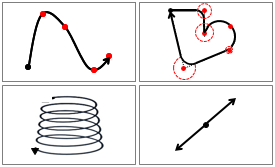
Move SX and Move SJ are spline motions, used to move the robot along the curve that connects various waypoints and target points. In the case of Move B, the robot moves along a straight line and an arc composed of multiple waypoints and target points within a work space. Additionally, Move Spiral can travel outward from the center of the spiral, while the Move Periodic can move the robot along a path that is repeated periodically.
2. Move SX
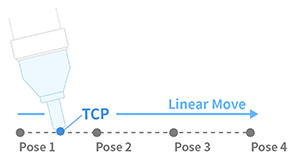
The robot moves along a spline curve path that connects arbitrarily entered waypoints to the target location. The entered converting speed and rotational speed are the maximum speeds for movement and when “Fixed” is selected in the Speed option, constant motion can be performed at the entered speed depending on the condition.
[Try it]
1) Set an arbitrary reference point with Move J and select Add Waypoint to create 3 segments.
2) On the Local tab, specify the speed (150 mm/s) and move along the spline curve path that connects the waypoints specified in 1).
3) Select “Fixed” in the Speed option and move with speed (150 mm/s).
3. Move SJ
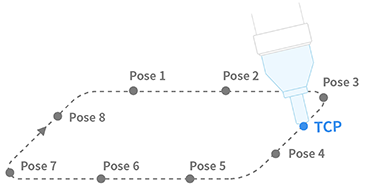
The robot moves along a spline curve that connects to the target position through the waypoints of the arbitrarily entered joint space. Motion is performed along a curved path connecting multiple waypoints and target points represented by the angle values of each joint. The entered speed/acceleration refers to the maximum speed/acceleration of the route, and the position of the entered waypoint determines the deceleration and acceleration during motion.
[Try it]
1) Set an arbitrary reference point with Move J and select Add Waypoint to create 3 segments.
2) On the Local tab, specify the speed and acceleration as shown below, then move along the spline curve path that connects the waypoints specified in 1).
- Speed: 30 º/s, Acceleration: 60 º/s²
4. Move B
Move B is used to move the robot along straight and arc paths connected by multiple waypoints and target points within the workspace. Each segment is blended to the set radius value and moved at a constant speed. Blending mode in the basic motion command runs according to the Duplicate and Override option values during motion when the robot reaches the blending point. In the case of Move B, the speed, path, etc. will be set previously and then the motion will be performed.
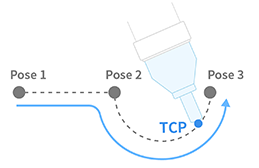
Move B is used when needing to operate at a constant speed, such as the application of liquid to a surface, and movement is restricted when the flow exceeds the blendable range in the property value setting.
- In the blending section, if there is a sudden change of direction depending on the condition, a user input error will appear to prevent rapid acceleration.
- If a continuous line-line segment has the same direction, a user input error appears due to the overlapping input of a line.
[Try it]
1) Use Move J, set an arbitrary reference point with speed: 30 º/s, acceleration: 60 º/s².
2) In Add Waypoint, enter a radius value of 20 mm with Move L and create an arbitrary segment 1.
3) In Add Waypoint, enter a radius value of 20 mm with Move C and create 2 waypoints.
4) Set the global value, the speed as 150 mm/s.
The last waypoint blending radius value is not reflected and motion is performed with constant speed.
5. Move Spiral
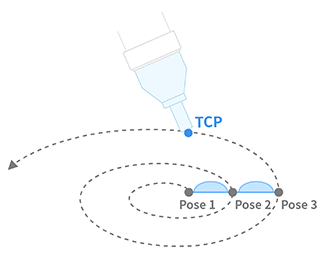
The radius increases in the radial direction and moves in parallel with the rotating spiral motion and the axis direction. Used primarily for finding holes, the total number of rotations, axis of rotation, maximum radius, and distance between the axes must be specified.
[Try it]
Create a program with a total of 10 rotations at an arbitrary starting point, a maximum radius of 50 mm from the X/Y plane of the tool, and a rotation towards the Z axis of the tool, and a 10 second performance time.
1) Use Move J to move to the initial position joint.
2) Define the operating conditions in the property values as shown below.
- Number of turns: 10 rev
- Maximum radius: 50 mm
- Time: 10 sec.
- Rotational axis: AXIS_Z
When creating a path, there may be limitations (rotation acceleration through spiral path) for stable motion. In such cases, it is recommended to adjust the speed, acceleration value, or time to decrease the value.
6. Move Periodic
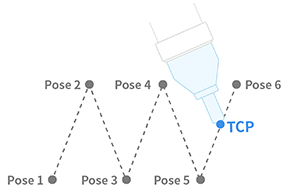
Move Periodic is used to move the robot along a path that is repeated periodically. Periodic motion is performed for each axis (binary and rotation) of the reference coordinates entered in relative motion at an arbitrary starting point. The characteristics of the motion for each axis are determined by amplitude and the one-time motion repetition. The acceleration and deceleration times at the start and end, and the total motion time, are set by periods and repetitions.
[Try it]
Program the tool coordinate system X-axis (10mm amplitude, 1 second period), Y-axis (30 deg amplitude, 1 second period) to perform a total of 5 repetitions.
1) In Amplitude, enter 10 mm for X value and 30 ° for B value.
2) In Period, enter 1 sec for X value and 1 sec for B value.
3) Set the tool on the reference coordinate system and enter the repeat count as 5 counts.
If a maximum speed error occurs during motion, refer to the following formulas to modify the amplitude and period.
- Maximum speed=amplitude(amp)*2*pi(3.14)/period(period)
(e.g. if amplitude=10 mm, period=1 second, then maximum speed=62.83 mm/sec)
7. Summary
This course introduced the advanced motion commands provided by Doosan Robots. Simple programming is possible through the task builder, and the task writer can perform more advanced robot motion through various command and condition settings. It is necessary to understand each motion-specific feature and to be familiar with the property options.
Recommended resources
- Doosan Robotics User & Programming manual: https://robotlab.doosanrobotics.com
※ Doosan Robotics has copyright and intellectual property rights to all content and all designs shown in this material. Therefore, any use, copying, or dissemination of them without written permission from Doosan Robotics is prohibited. Please note that you will be held solely responsible for any improper use or alteration of the patent rights of Doosan Robotics.
Recommended Training Class
These learning opportunities can help you get started quickly.
Article
Programming with the robot’s PROFINET IO Device Function
Article
How to program with EtherNet/IP
Article
How to program using TCP/IP Socket